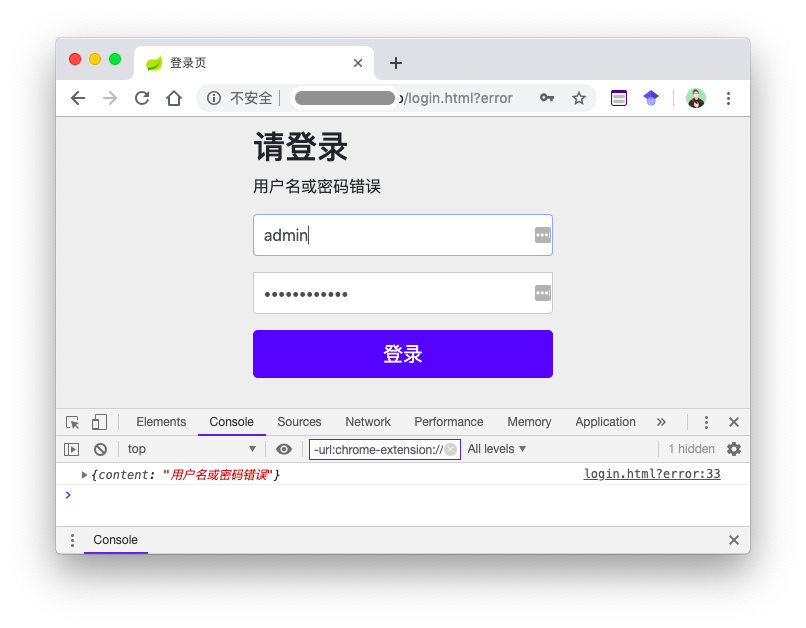
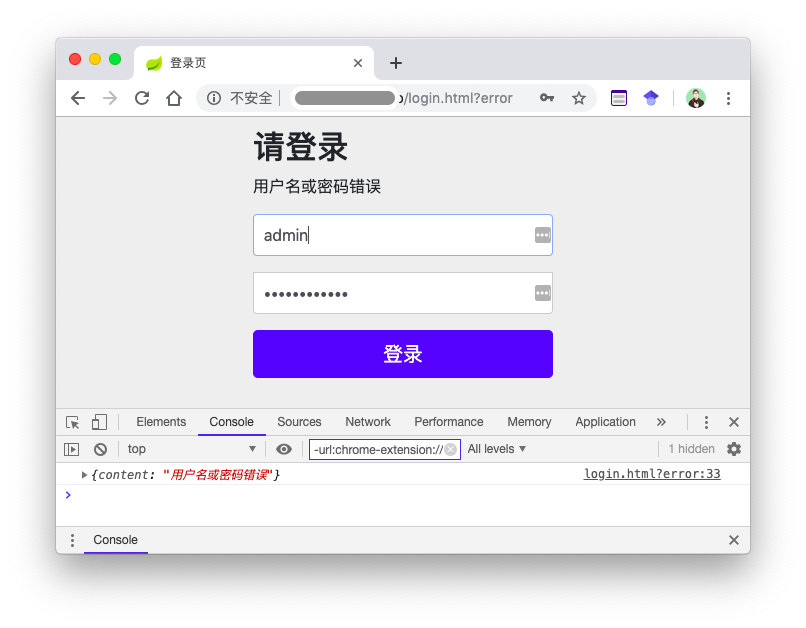
Spring Security 中提供了默认的用户登录页面,但在实际项目中默认的登录页自然是无法满足需求的,这里不讨论如何自定义登录页,仅针对自定义表单登录页面后如何获取用户验证错误信息,并如上图一样为用户呈现提示说说自己的方案。
如果你清楚Spring Security默认的错误处理,那么你可以跳过接下来的章节。
Spring security 中用户验证错误信息去了哪里? Spring Security 中主要通过 AbstractAuthenticationProcessingFilter处理登录,而其孩子类UsernamePasswordAuthenticationFilter 则负责处理表单登录逻辑,看看源码:
AbstractAuthenticationProcessingFilter:
1
2
3
4
5
6
7
8
9
10
11
12
13
14
15
16
17
18
19
20
21
22
23
24
25
26
27
28
29
30
31
32
33
public void doFilter (ServletRequest req, ServletResponse res, FilterChain chain) throws IOException, ServletException { Authentication authResult; try { authResult = attemptAuthentication(request, response); if (authResult == null ) { return ; } sessionStrategy.onAuthentication(authResult, request, response); } catch (InternalAuthenticationServiceException failed) { logger.error( "An internal error occurred while trying to authenticate the user." , failed); unsuccessfulAuthentication(request, response, failed); return ; } catch (AuthenticationException failed) { unsuccessfulAuthentication(request, response, failed); return ; } }
attemptAuthentication(request, response)中是从 request 中提取 username、password 以及调用 Provider 验证的过程,这一过程并非本文重点,不做详述。
可以看到,当用户验证失败后,会交给 unsuccessfulAuthentication(..., exception) 处理。看看它的实现:
1
2
3
4
5
6
7
8
9
10
11
12
protected void unsuccessfulAuthentication (HttpServletRequest request, HttpServletResponse response, AuthenticationException failed) throws IOException, ServletException { SecurityContextHolder.clearContext(); rememberMeServices.loginFail(request, response); failureHandler.onAuthenticationFailure(request, response, failed); }
若开发者没有自定义失败处理器,则会调用默认的失败处理器—— SimpleUrlAuthenticationFailureHandler 的实现。
1
2
3
4
5
6
7
8
9
10
11
12
13
14
15
16
17
18
19
20
21
22
23
24
25
26
27
public void onAuthenticationFailure (HttpServletRequest request, HttpServletResponse response, AuthenticationException exception) throws IOException, ServletException { if (defaultFailureUrl == null ) { logger.debug("No failure URL set, sending 401 Unauthorized error" ); response.sendError(HttpStatus.UNAUTHORIZED.value(), HttpStatus.UNAUTHORIZED.getReasonPhrase()); } else { saveException(request, exception); if (forwardToDestination) { logger.debug("Forwarding to " + defaultFailureUrl); request.getRequestDispatcher(defaultFailureUrl) .forward(request, response); } else { logger.debug("Redirecting to " + defaultFailureUrl); redirectStrategy.sendRedirect(request, response, defaultFailureUrl); } } }
当用户自定义了错误跳转URL时(若未自定义登录页面,那默认的错误跳转页为 /login?error),Spring Security 会调用 saveException(...),后将用户导向登录失败页面。
1
2
3
4
5
6
7
8
9
10
11
12
13
14
15
16
protected final void saveException (HttpServletRequest request, AuthenticationException exception) { if (forwardToDestination) { request.setAttribute(WebAttributes.AUTHENTICATION_EXCEPTION, exception); } else { HttpSession session = request.getSession(false ); if (session != null || allowSessionCreation) { request.getSession().setAttribute(WebAttributes.AUTHENTICATION_EXCEPTION, exception); } } }
现在一切都明了了,Spring Security 将用户认证错误的信息放在了Session中,而存放的 Key 便是:
1 public static final String AUTHENTICATION_EXCEPTION = "SPRING_SECURITY_LAST_EXCEPTION" ;
自定义登录页面获取用户验证错误信息 当我们自定义登录页面后,在自己的登录页上显示错误提示自然是需求之中了。而由于使用 form 表单进行登录,当 submit 后页面会被刷新,服务器无法通过 response 返回用户认证错误的信息。我采取的方案是当用户登录错误是将用户认证错误的信息存放在 session 中,同时将其导向登录页面 /login?error,不过此时请求路径中多了一项 error 参数,前端通过检测路径中是否有 error 参数,若存在,则向服务器发送 Ajax 请求获取错误信息。
一个简单的 demo:
1
2
3
4
5
6
7
8
9
10
11
12
13
14
15
16
17
18
19
20
21
22
23
<p class ="error-msg" id="error-msg" ></p> <script type ="text/javascript" > function hasParameter (para ) { const reg = new RegExp ("(^|&)" + para + "([^&]*)(&|$)" ); let r = window .location .search .substr (1 ).match (reg); return r != null } (function ( if (hasParameter ('error' )) { $.ajax ({ url :"./authentication/error" , success :function (result ){ console .log (result); $("#error-msg" ).html (result.content ) } }); } })(); </script >
而服务器端,我创建了一个获取错误信息的 Controller:
1
2
3
4
5
6
7
8
9
10
11
12
13
14
15
16
17
18
19
20
21
22
23
24
25
26
27
28
29
30
31
32
33
34
35
36
37
38
39
40
41
@RestController public class LoginErrorController { @Autowired private AssistantCoreProperties properties; private RedirectStrategy redirectStrategy = new DefaultRedirectStrategy (); @GetMapping("/authentication/error") public SimpleResponse loginError (HttpServletRequest request, HttpServletResponse response) throws IOException { SimpleResponse simpleResponse = new SimpleResponse (); String from = request.getHeader("Referer" ); if (from == null || !StringUtils.contains(from, ".html" )) { response.sendError(HttpStatus.NOT_FOUND.value(), HttpStatus.NOT_FOUND.getReasonPhrase()); return null ; } if (StringUtils.contains(from, properties.getFailureUrl())) { AuthenticationException exception = (AuthenticationException)request.getSession().getAttribute(WebAttributes.AUTHENTICATION_EXCEPTION); if (exception == null ) { return simpleResponse; } simpleResponse.setContent(exception.getMessage()); request.getSession().removeAttribute(WebAttributes.AUTHENTICATION_EXCEPTION); } else { redirectStrategy.sendRedirect(request, response, "/404.html" ); } return simpleResponse; } }
服务器经过验证,将用户认证错误的信息发给前端后将错误信息从 session 中清除掉。
更新,2019年04月01日:
当创建 “错误信息获取” 的 LoginErrorController后,还需要再做一步:将获取错误信息的请求 URL 添加到 Spring Security 的审查例外中。
eg:
1
2
3
4
@Override protected void configure (HttpSecurity http) throws Exception { http.authorizeRequests().antMatchers("/authentication/error" ).permitAll(); }
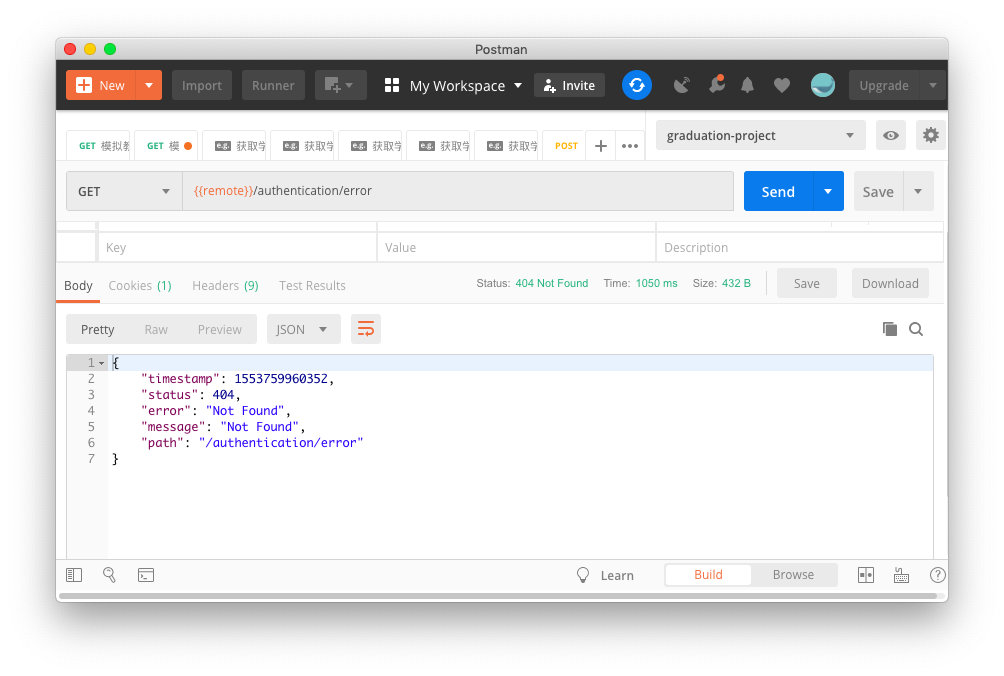
测试结果 模拟 APP 发起请求
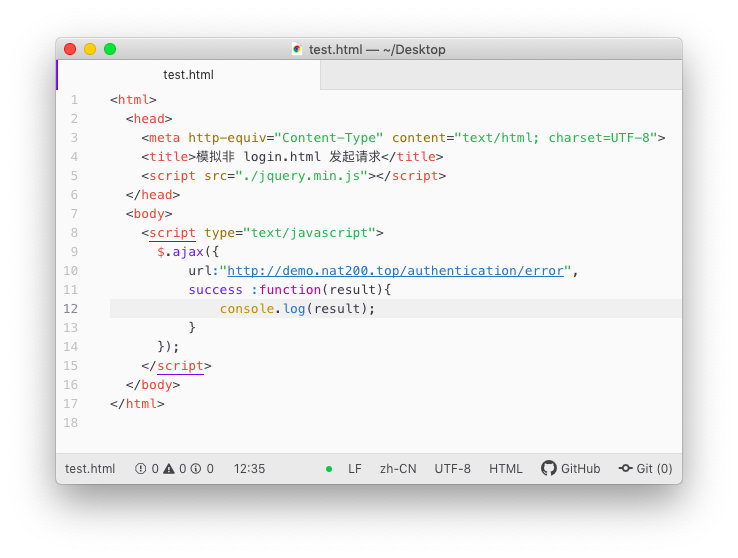
模拟非 login.html 发起请求 Code:
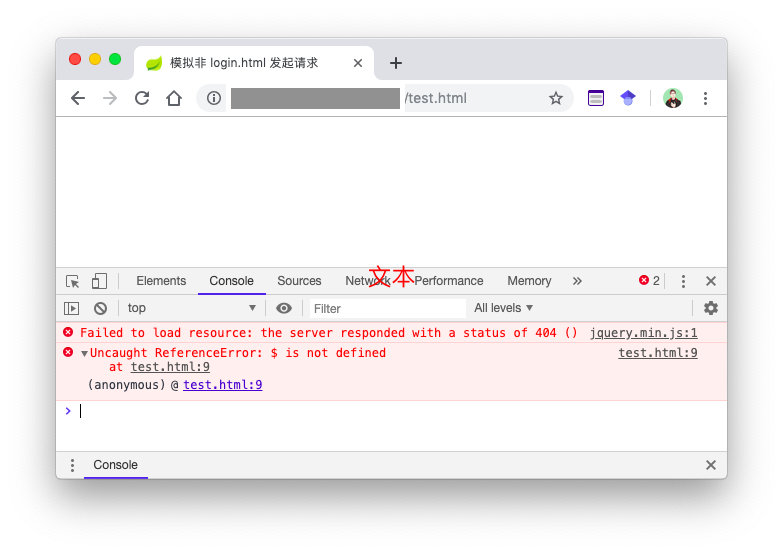
结果:
自定义登录页测试